Delhivery is India’s largest fully-integrated logistics company by revenue. With over 2 billion orders fulfilled, 18,700+ pincodes covered, 38 automated sort centers, 160 hubs, and 7,500 partner offices across India (Delhivery, 2025), it is the backbone of Indian eCommerce logistics – used by 26,500+ businesses ranging from Tier 1 D2C brands to enterprise marketplaces.
But if you are managing Delhivery shipments manually – logging into the Delhivery portal, checking AWB status one by one, downloading manifest reports, copy-pasting tracking updates to your OMS – you are getting significantly less value than Delhivery’s technology infrastructure is designed to deliver. Delhivery’s API is one of the most capable in Indian logistics. The question is how to connect it efficiently to your existing systems.
This guide covers everything: what Delhivery tracking integration means, how Delhivery’s AWB and tracking API works, the three integration methods (direct API, aggregator, multi-courier platform), Delhivery tracking status codes explained, and how ShipSagar integrates with Delhivery to give you automated tracking, NDR alerts, and carrier analytics without building a custom integration
Orders fulfilled: 2+ billion (cumulative)
Pincode coverage: 18,700+ pincodes across India
Infrastructure: 38 automated sort centers, 160 hubs, 7,500 partner offices
Businesses served: 26,500+ eCommerce businesses
Services: Express Parcel, Warehousing, PTL, FTL, Cross-border (220+ countries)
Technology: Address Standardization API, Address Validation API, Geocoding API, GPS tracking
COD remittance: Faster remittance cycles vs industry average (2-3 days for eligible businesses)
New in 2025: ‘Rapid Commerce’ service – sub-2-hour delivery in select metros
TOC Table of Contents
1. What Is Delhivery Tracking Integration?
2. Delhivery AWB Number – Format, Structure, and How to Generate
3. Delhivery Tracking Status Codes – Complete Reference
4. How Delhivery’s Tracking API Works
5. Three Ways to Integrate Delhivery Tracking
6. The Problem with Single-Courier Integration (And the Multi-Courier Solution)
7. How ShipSagar Automates Delhivery Tracking
8. Frequently Asked Questions
What Is Delhivery Tracking Integration?
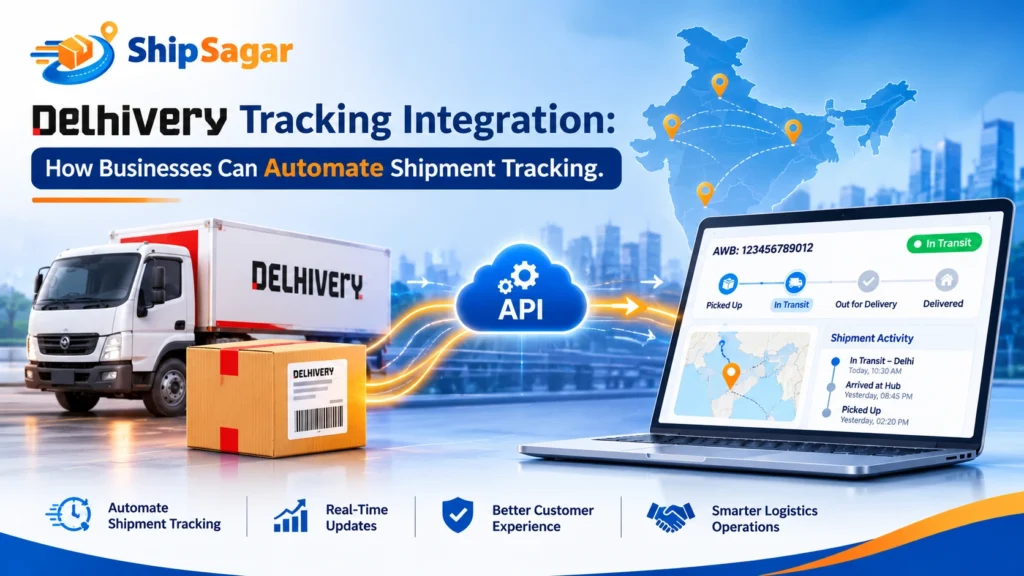
Delhivery tracking integration is the process of connecting Delhivery’s shipment tracking data to your business systems – your eCommerce store (Shopify, WooCommerce), your OMS (Unicommerce, Vinculum), your customer notification system, or your analytics dashboard – so that tracking updates flow automatically without manual portal checking.
There are two levels of Delhivery integration most businesses need:
| Integration Type | What It Does | Who Needs It |
| Shipping Integration | Create shipments, generate AWBs, print labels, request pickups – all via API without logging into Delhivery portal | High-volume sellers creating 100+ shipments/day via direct Delhivery contract |
| Tracking Integration | Pull live tracking status for existing AWBs, receive webhook push on status changes, feed status to OMS and customer notifications | All Delhivery users who want automated status updates without manual portal checking |
This guide focuses on tracking integration – the most universally needed capability. Even sellers who book Delhivery shipments through Shiprocket, NimbusPost, or their OMS still need a tracking integration to get live status updates, trigger customer notifications, and receive NDR alerts.
|
KEY INSIGHT Why Manual Delhivery Portal Checking Does Not Scale: 100 orders/day = 100 AWBs to check. 5-10 minutes daily if all goes well. 500 orders/day = 500 AWBs. At peak, multiple status updates per order. Manually unmanageable. 1,000+ orders/day = No team can manually check all statuses in time to act on NDRs within the 24-hour intervention window. Tracking integration eliminates manual checking entirely – status updates push to your system automatically as they happen. |
Delhivery AWB Number – Format, Structure, and How to Generate
1 Delhivery AWB Format
Delhivery AWB (Air Waybill) numbers are 10-18 digit all-numeric strings – the most common format being 13-15 digits. Unlike DTDC (letter prefix) or India Post (letter suffix), Delhivery AWBs are purely numeric and typically longer than other Indian courier AWBs.
| AWB Type | Format | Example |
|
Standard B2C |
13-15 digit numeric |
1234567890123 |
|
Express Parcel |
10-18 digit numeric |
12345678901234 |
|
COD Shipment |
Same format – COD flag in system |
1234567890123 (COD flagged internally) |
|
Reverse / RTO |
Same AWB – return journey tracked on original AWB |
Original AWB with reverse status updates |
2 How to Generate a Delhivery AWB
- Direct Delhivery portal: Log into the Delhivery Business Portal -> Create Shipment -> Fill order details -> AWB auto-generated. Download label with AWB barcode.
- Delhivery Shipping API: POST request to Delhivery’s Create Shipment endpoint with order details in JSON -> AWB returned in API response -> Auto-printed or synced to OMS.
- Via shipping aggregator: Shiprocket/NimbusPost allocate Delhivery -> AWB generated by Delhivery and returned via aggregator API -> Appears in aggregator dashboard.
- Via OMS: Unicommerce/Vinculum push order to Delhivery API -> AWB returned and stored in OMS against the order.
|
TIP AWB Auto-Detection: ShipSagar automatically identifies Delhivery AWBs from their numeric format – you do not need to manually specify ‘Delhivery’ when adding AWBs. Any 10-18 digit numeric tracking number is detected as Delhivery. If a number matches multiple carriers, ShipSagar uses additional validation to confirm the correct carrier. |
Delhivery Tracking Status Codes – Complete Reference
Delhivery uses a specific set of tracking status codes. Here is the complete reference guide with plain-language explanations:
| Delhivery Status | Plain Language Meaning | Action Required? |
|
Pickup Awaited |
AWB generated. Courier not yet collected parcel from seller. |
No – wait for pickup |
|
Manifested |
Shipment added to courier manifest. About to be picked up or already in courier system. |
No |
|
Picked Up |
Courier executive physically collected the parcel. Tracking now live. |
No – in transit |
|
In Transit |
Parcel moving between Delhivery hubs toward destination. May have 24-48hr scan gaps. |
No – unless 72hrs no update |
|
Reached Destination Hub |
Parcel arrived at Delhivery’s local hub in delivery city. Delivery expected next 1-2 days. |
No – delivery imminent |
|
OFD (Out for Delivery) |
Courier executive has parcel and is en route to delivery address. Expect delivery today. |
Ensure buyer is available |
|
Delivered |
Parcel successfully handed to recipient. Timestamp and POD captured. |
Close order, trigger review |
|
Undelivered |
Delivery attempted but failed. NDR generated with reason code. |
Contact buyer within 2 hours |
|
RTO Initiated |
All delivery attempts exhausted. Parcel starting return journey to seller. |
Prepare for RTO – usually cannot be stopped |
|
RTO Delivered |
Parcel returned to seller’s warehouse. RTO complete. |
Inspect, restock, issue refund |
|
Shipment Held |
Shipment held at hub – usually for address issue, dimensions check, or hub exception. |
Contact Delhivery with AWB |
|
Lost in Transit |
Shipment cannot be located in Delhivery’s network. File a claim. |
File claim immediately with POD |
|
NORMALIZATION How ShipSagar Normalizes Delhivery Status Codes: Delhivery uses its own status language – ‘OFD’, ‘Undelivered’, ‘RTO Initiated’. ShipSagar normalizes all Delhivery status codes into consistent, human-friendly language on your branded tracking page: ‘OFD’ becomes ‘Out for Delivery’, ‘Undelivered’ becomes ‘Delivery Attempted – Rescheduling Required’. This consistency is critical when you ship via multiple couriers – Blue Dart ‘With Delivery Courier’ and Delhivery ‘OFD’ both display as ‘Out for Delivery’ on your ShipSagar branded tracking page. |
How Delhivery’s Tracking API Works
Delhivery provides a REST API for tracking that businesses can integrate directly. Here is how it works technically:
1 Delhivery Tracking API – Core Endpoints
- GET /api/v1/packages/json/?waybill=[AWB]&token=[API_TOKEN]: Returns current tracking status, scan history, and location for a single AWB.
- Bulk tracking: Multiple AWBs can be passed as comma-separated values in the waybill parameter – up to 25 per request (subject to rate limits).
- Webhooks (Push notifications): Delhivery can push status updates to your webhook endpoint when status changes occur. This is the most efficient integration for high-volume sellers – eliminates polling.
2 Delhivery API Authentication
- API Token: All Delhivery API requests require an API token issued to your Delhivery business account. Get it from your Delhivery account manager or the Delhivery Business Portal under Settings -> API.
- Rate limits: Delhivery API has rate limiting. Polling too frequently can result in temporary blocks. Use webhook push events for real-time tracking instead of constant polling for high-volume operations.
3 Sample Delhivery Tracking API Response (Simplified)
GET /api/v1/packages/json/?waybill=1234567890123&token=YOUR_TOKEN
|
API RESPONSE Sample Delhivery Tracking Response Structure: { “ShipmentData”: [ { “AWB”: “1234567890123”, “Status”: { “Status”: “Delivered”, “StatusDateTime”: “2026-08-10T14:23:00”, “StatusLocation”: “Mumbai”, “Instructions”: “Delivered to RESIDENT” }, “Scans”: [ // Array of scan events with timestamp, location, status ] } ] } |
4 Direct API Integration vs Third-Party Platform
Building a direct Delhivery API integration requires:
- Developer resources (1-3 days for basic integration, 1-2 weeks for production-grade with error handling)
- Ongoing maintenance as Delhivery API updates or changes
- Building your own notification system on top of the tracking data
- Managing rate limits, retries, and error handling
For most D2C brands and growing eCommerce businesses, a third-party multi-courier platform like ShipSagar is more efficient – because it handles the Delhivery API integration, plus 499 other courier integrations, while adding NDR alerts, carrier analytics, and customer notifications out of the box.
Three Ways to Integrate Delhivery Tracking for Your Business
Method 1 – Direct Delhivery API Integration
Best for: Enterprise brands with dedicated tech teams, high daily volumes (1,000+ shipments/day), and need for deep OMS integration.
How it works: Your developer connects to Delhivery’s REST API endpoint using your Delhivery API token. You build polling logic or set up Delhivery webhooks to receive status updates. Status data is ingested into your OMS and triggers your customer notification system.
Advantages: Full control over data flow. Deep OMS integration. Can combine with Delhivery’s shipping API for end-to-end automation.
Limitations: Development investment (1-2 weeks). Maintenance overhead. Only covers Delhivery – if you add Blue Dart or DTDC, you need separate integrations for each.
Method 2 – Via Shipping Aggregator (Shiprocket / NimbusPost)
Best for: Sellers who book Delhivery shipments through Shiprocket or NimbusPost and want tracking within the aggregator dashboard.
How it works: When you book a Delhivery shipment through Shiprocket, the AWB is stored in Shiprocket’s system. Shiprocket pulls tracking from Delhivery and displays it in the Shiprocket dashboard. Some aggregators also send basic dispatch notifications.
Limitations: Only tracks Delhivery shipments booked through the aggregator – not your direct Delhivery contract shipments. Limited carrier analytics. NDR management is basic. Branded tracking page is on aggregator’s domain, not yours.
Method 3 – Multi-Courier Tracking Platform (ShipSagar) – Recommended
Best for: D2C brands and eCommerce sellers using 2+ couriers simultaneously (Delhivery + Blue Dart + DTDC + India Post etc.) who need unified tracking, NDR alerts, and carrier analytics across all carriers.
How it works: Add AWB numbers to ShipSagar – manually, via CSV upload, or via ShipSagar’s REST API. ShipSagar connects to Delhivery’s API (and 499 other courier APIs) and pulls live tracking data automatically. Status normalized and displayed in one unified dashboard.
Advantages over direct integration:
- Works on Day 1 – no development required for CSV/manual method
- 500+ courier integrations – not just Delhivery
- Real-time NDR alerts across all carriers
- Branded tracking page on your domain
- Carrier analytics – Delhivery’s RTO% vs Blue Dart’s RTO% by zone
- Email + SMS customer notifications (WhatsApp optional add-on)
| Factor | Direct Delhivery API | Via Aggregator | ShipSagar |
|
Setup Time |
1-2 weeks dev |
Instant (if already on aggregator) |
5 minutes (CSV method) |
|
Dev Required |
Yes |
No |
No (CSV) or minimal (API) |
|
Multi-Courier |
Delhivery only |
Aggregator couriers only |
500+ couriers |
|
NDR Alerts |
Build yourself |
Basic only |
Real-time, all couriers |
|
Carrier Analytics |
Build yourself |
Limited |
Delivered%, RTO%, transit time |
|
Branded Tracking Page |
Build yourself |
Aggregator domain |
ShipSagar domain + (custom domain, paid add-on) |
|
Customer Notifications |
Build yourself |
Basic email |
Email + (SMS + WhatsApp paid add-on) |
|
Pricing |
Dev cost + maintenance |
Bundled with aggregator |
Starts at Rs 2/shipment |
The Problem with Single-Courier Integration (And the Multi-Courier Solution)
Even if you build a perfect Delhivery tracking integration, you likely ship with more than just Delhivery. Most Indian D2C brands above 200 orders/month use 3-5 courier partners simultaneously:
- Delhivery – for most orders, best metro coverage
- Blue Dart – for premium/time-sensitive orders
- India Post – for Tier 4 and rural pincodes
- XpressBees or DTDC – for backup or zone-specific routing
Building separate tracking integrations for each courier – Delhivery API + Blue Dart API + DTDC API + India Post – is 3-6 months of development work, with ongoing maintenance as each carrier’s API evolves. Each integration has different authentication, different response formats, different rate limits, and different status code systems.
ShipSagar solves this with a single integration: one REST API, one dashboard, 500+ couriers. Add any AWB from any courier – ShipSagar auto-detects the carrier, pulls live tracking, normalizes status codes, and feeds your branded tracking page and customer notifications – all from one system at Rs 2/shipment.
|
EXAMPLE Real Scenario – Why Multi-Courier Integration Matters: A D2C electronics brand ships 500 orders/day: – 300 via Delhivery (direct contract) – 100 via Blue Dart (premium orders) – 60 via DTDC (regional) – 40 via India Post (rural pincodes) With separate integrations: 4 separate portals, 4 different status code systems, 4 separate NDR workflows, no unified carrier analytics. With ShipSagar: One dashboard, all 500 orders tracked automatically, unified NDR alerts, one analytics view showing Delhivery RTO% vs Blue Dart RTO% vs DTDC RTO% by zone. |
How ShipSagar Automates Delhivery Tracking
Here is the complete step-by-step of how ShipSagar integrates with Delhivery for automated tracking:
Step 1 – Add Delhivery AWBs to ShipSagar
- Manual entry: ShipSagar Dashboard -> Add Shipment -> Enter Delhivery AWB (any 10-18 digit numeric string) -> ShipSagar auto-detects as Delhivery -> Tracking begins immediately.
- Bulk CSV upload: Download ShipSagar’s CSV template -> Fill in Delhivery AWBs (and AWBs from any other couriers) -> Upload -> All start tracking. Ideal for daily batch uploads.
- REST API (PushShipment): POST to ShipSagar’s PushShipment endpoint with AWB number -> ShipSagar auto-detects Delhivery -> Returns tracking URL and begins monitoring. Integrate with your OMS for fully automated sync.
Step 2 – ShipSagar Pulls Live Delhivery Tracking
ShipSagar connects to Delhivery’s tracking API and pulls real-time status updates for all your Delhivery AWBs. No manual refresh. No portal login. Status updates automatically as Delhivery scans the parcel at each hub, at OFD, at delivery, and at NDR.
Step 3 – Automated Notifications Fire
At each Delhivery milestone – Picked Up, In Transit, OFD, Delivered, Undelivered – ShipSagar automatically sends Email + SMS notifications to your customer (WhatsApp optional add-on). No manual trigger. The buyer knows where their order is without contacting your support team.
Step 4 – Real-Time NDR Alerts to Your Team
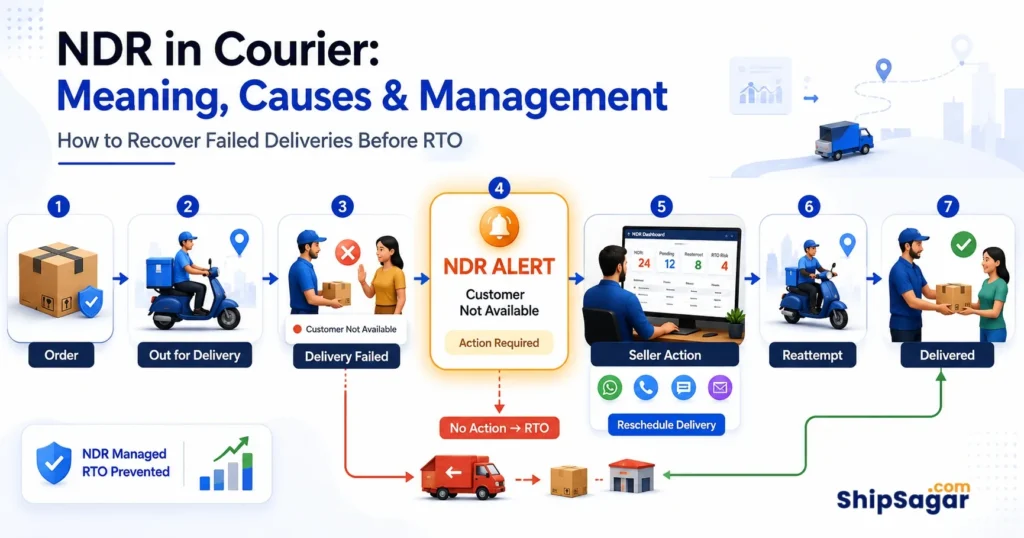
When Delhivery marks a shipment as ‘Undelivered’, ShipSagar immediately sends an NDR alert to your operations team – with the AWB number, reason code, and delivery attempt timestamp. Your team can contact the buyer within 2-4 hours – well within the 24-48 hour window before Delhivery initiates RTO.
Step 5 – Carrier Analytics Dashboard
ShipSagar’s analytics dashboard shows Delhivery-specific performance metrics: Delivered%, RTO%, In-Transit%, Undelivered%, and average transit time – broken down by state and pincode. Use this data monthly to identify Delhivery’s weaker zones and route those orders to a better-performing alternative carrier.
Step 6 – Branded Tracking Page
When your customer clicks the tracking link in their notification, they land on your branded tracking page on your own domain – not on Delhivery.com. All Delhivery status codes are normalized to human-friendly language. The customer sees ‘Out for Delivery in Mumbai today’ – not ‘OFD’.
|
CTA Start Automating Delhivery Tracking Today: ShipSagar integrates with Delhivery + 499 other Indian and global couriers in one platform. Add your first Delhivery AWBs in 5 minutes – no development required. Real-time NDR alerts, automated notifications, carrier analytics – all included.
Free Plan: 50 shipments, lifetime free, no credit card. Growth Plan: Starts at Rs 2/shipment. No monthly fee. Start at shipsagar.com |
-> Multi-courier tracking including Delhivery:
-> Shipment Tracking API – integrate Delhivery + 499 more:
Related Guides on ShipSagar
Courier Tracking Guides:
- What Is AWB Number? Complete Guide for eCommerce Sellers
- Courier Tracking India: Complete Guide – Delhivery, Blue Dart, India Post & 500+ More
- What Is NDR in Courier? Meaning, Causes & How to Manage
- How to Reduce RTO Rate in eCommerce India