STATS WhatsApp Delivery Notifications – The India Numbers (2026):
550+ million monthly active WhatsApp users in India – world’s largest market.
98% message open rate on WhatsApp vs 22% for email (Meta Business Reports 2025-26).
88% of WhatsApp messages read within 5 minutes of delivery (Chatarmin, 2026).
WhatsApp grew 314% in India between 2021-2025, with 21% growth in 2025 alone.
30%+ of Indian eCommerce brands use WhatsApp API for order tracking updates.
WhatsApp COD confirmation flows cut RTO by roughly one-third (published case studies)
Table of Contents
- Why WhatsApp Delivery Notifications Matter for Indian eCommerce
- WhatsApp vs Email vs SMS – Channel Comparison
- Types of WhatsApp Delivery Notifications for eCommerce
- Ready-to-Use WhatsApp Notification Templates
- How WhatsApp Delivery Notifications Work Technically
- WhatsApp Business App vs WhatsApp Business API
- WhatsApp Notification Pricing in India (2026)
- How to Add WhatsApp Notifications via ShipSagar
- Measuring WhatsApp Notification ROI
- Frequently Asked Questions
Why WhatsApp Delivery Notifications Matter for Indian eCommerce
Email was the default post-purchase communication channel for a decade. For Indian eCommerce in 2026, email is no longer sufficient on its own – especially for Tier 2 and Tier 3 city buyers who check email infrequently or not at all.The India-Specific Communication Reality
- Email open rates in India: 22-30% for transactional emails. Many buyers in non-metro cities check email infrequently.
- WhatsApp penetration: 550+ million Indian users. In Tier 2 and Tier 3 cities, WhatsApp is often the primary digital communication channel – for everything from family messages to payment confirmations.
- COD reality: 60-70% of orders in Tier 2/3 cities are COD. WhatsApp OFD notifications and COD confirmation messages directly reduce ‘buyer unavailable’ NDRs and doorstep refusals.
- Support channel preference: Indian buyers WhatsApp sellers directly when they want order updates. If you are not proactively sending updates, your buyers are WhatsApping your support team to ask for them.
The Business Case for WhatsApp Delivery Notifications
| Metric | Without WhatsApp Notifications | With WhatsApp Notifications |
| WISMO query rate | 30-50% of all support tickets | 5-15% (60-69% reduction) |
| COD RTO rate | 25-35% average in India | Reduces by ~1/3 with COD confirmation |
| Buyer unavailable NDRs | 20-25% of all NDRs | 30-40% reduction with OFD WhatsApp |
| Notification open rate | Email: 22-30% | WhatsApp: ~68-98% (measured range) |
WhatsApp vs Email vs SMS – Channel Comparison for Indian Buyers
| Factor | SMS | ||
| Open Rate | 68-98% | 22-30% | 85-90% |
| Read within 5 min | 88% | ~15% | ~75% |
| India Penetration | 550M+ users | Moderate | High but DND filtered |
| Rich Media | Images, buttons, videos | HTML supported | Text only |
| 2-way Communication | Yes – buyer can reply | Limited | No |
| COD Confirmation | Highly effective | Low response rate | Moderate |
| DND Filter Risk | Low – not DND filtered | Spam folder risk | High DND filter in India |
| Cost (India 2026) | Rs 0.114/utility message | Low (SMTP cost) | Rs 0.10-0.20/SMS |
| On ShipSagar | Paid add-on* | Included in Growth Plan | Paid add-on* |
| STRATEGY The Ideal Notification Strategy for India: Base layer: Email notifications – INCLUDED in ShipSagar Growth Plan. Reaches all buyers. Add-on layer 1: SMS* – paid add-on on ShipSagar. Reaches buyers who miss email. Add-on layer 2: WhatsApp* – paid add-on on ShipSagar. Highest open rate, best for India. The combination of Email (base) + WhatsApp* (add-on) provides maximum coverage. Start with Email. Add WhatsApp when ready for the add-on investment. |
Types of WhatsApp Delivery Notifications for eCommerce
1 Transactional / Utility Notifications (Delivery Updates)
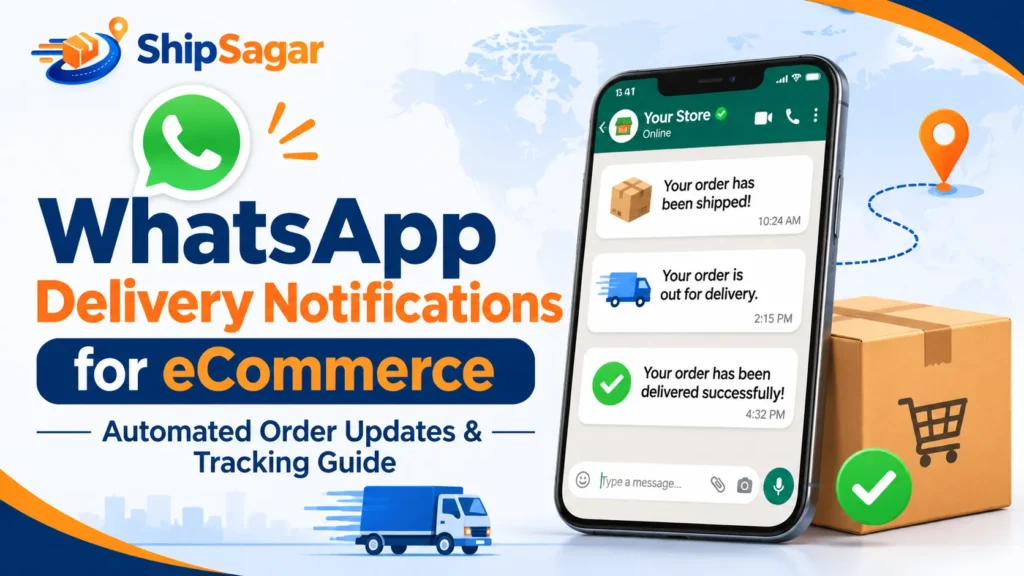
These are the core delivery milestone notifications. Under Meta’s 2026 pricing, utility messages (transactional) cost Rs 0.114 per message – significantly cheaper than marketing messages. All delivery notifications qualify as utility messages.- Order Confirmation: ‘Hi [Name], your order #[ID] for [Product] is confirmed for COD delivery to [City]. Amount: Rs [X].’
- Dispatched / Shipped: ‘Hi [Name], your order has been dispatched via [Courier]. AWB: [Number]. Track here: [link]. Expected delivery: [date].’
- In Transit: ‘Hi [Name], your order is on its way to [City]. Expected delivery: [date]. Track: [link].’
- Out for Delivery (OFD): ‘Hi [Name], your order is out for delivery today! Please ensure someone is available at [Address]. Need to reschedule? Reply here.’
- Delivered: ‘Hi [Name], your order has been delivered! We hope you love it. Share your experience: [review link].’
- Failed Delivery (NDR): ‘Hi [Name], we could not deliver your order today. Reply 1 to reschedule for tomorrow or 2 to update your address.’
2 Interactive / COD-Specific Notifications
- COD Confirmation (Pre-Dispatch): ‘Hi [Name], your COD order for Rs [Amount] is ready to ship. Reply YES to confirm or NO to cancel.’
- COD Amount Reminder: ‘Hi [Name], your order arrives today. Please keep Rs [Amount] ready for COD payment. Or pay via UPI here: [link].’
- Prepaid Switch Offer: ‘Hi [Name], switch your COD order to UPI and save Rs [50]. Pay here: [UPI link]. Offer valid 2 hours.’
Ready-to-Use WhatsApp Notification Templates
WhatsApp Business API requires pre-approved message templates. Here are optimised templates for each delivery milestone – ready to submit for Meta approval:| TEMPLATE 1 Order Dispatched / Shipped: Template Name: order_shipped_india | Category: UTILITY Hi {{1}}, Great news! Your {{2}} order has been dispatched. Order ID: {{3}} Courier: {{4}} | AWB: {{5}} Expected Delivery: {{6}} Track your order: {{7}} Questions? Reply to this message. – {{2}} Team |
| TEMPLATE 2 Out for Delivery (OFD): Template Name: out_for_delivery_india | Category: UTILITY Hi {{1}}, Your {{2}} order is OUT FOR DELIVERY today! Courier: {{3}} | AWB: {{4}} Delivery address: {{5}} Please ensure someone is available to receive the parcel. [Button 1]: Track Order -> {{6}} [Button 2]: Need Help -> Reply |
| TEMPLATE 3 COD Confirmation (Pre-Dispatch): Template Name: cod_confirmation_india | Category: UTILITY Hi {{1}}, Your COD order is ready to ship! Order: {{2}} | Amount: Rs {{3}} | Delivery to: {{4}} Please confirm to proceed with dispatch. [Quick Reply 1]: YES, Dispatch [Quick Reply 2]: NO, Cancel [Quick Reply 3]: Change Address No response in 6 hours = auto-dispatched. |
| TEMPLATE 4 Failed Delivery / NDR: Template Name: delivery_failed_india | Category: UTILITY Hi {{1}}, We attempted delivery of your {{2}} order today but could not reach you. Reason: {{3}} [Quick Reply 1]: Reschedule for Tomorrow [Quick Reply 2]: Update Delivery Address [Quick Reply 3]: Switch to UPI (save Rs {{4}}) Please respond within 24 hours to avoid return of your order. |
How WhatsApp Delivery Notifications Work Technically
1 The WhatsApp Business API (WABA) Architecture
- Your system triggers a notification: A shipment status updates – Dispatched, OFD, Delivered, or Failed. This triggers a notification event.
- Notification sent to a BSP (Business Solution Provider): A Meta-authorized company provides access to the WhatsApp Business API. ShipSagar’s WhatsApp add-on routes through a supported BSP.
- BSP sends via Meta’s API: The approved template message is submitted to Meta’s API with the customer’s phone number and variable values.
- Meta delivers to customer’s WhatsApp: Message appears in the customer’s chat from your business account.
- Customer receives and reads: Open rate ~68-98%. If template includes buttons, customer can tap to track, confirm, or reschedule.
2 Message Template Approval
- All WhatsApp Business API messages must use pre-approved message templates
- Templates must be in the correct category (Utility for delivery notifications)
- Approval typically takes 24-48 hours
- Customers must have explicitly opted in to receive WhatsApp messages from your business
WhatsApp Business App vs WhatsApp Business API
| Factor | WhatsApp Business App (Free) | WhatsApp Business API (via ShipSagar add-on) |
| Who it’s for | Very small sellers, under 50 orders/month | Growing D2C brands, 50+ orders/month |
| Automation | Manual only – no automation | Fully automated – trigger-based |
| Scale | 1 agent, 1 device only | Unlimited volume |
| Message Templates | Limited template support | Full Meta-approved templates + buttons |
| Cost | Free (manual effort is the cost) | ShipSagar paid add-on + Rs 0.114/utility message |
| API Integration | No | Yes – courier tracking events trigger messages |
WhatsApp Notification Pricing in India (2026)
Since July 2025, Meta charges per message delivered – not per conversation. All delivery notifications qualify as utility messages:| Message Type | Meta Rate (India 2026) | Delivery Notifications? | Cost Level |
| Utility Messages | Rs 0.114 per message | YES – all delivery notifications | Lowest |
| Authentication | Rs 0.114 per message | Yes – COD verification | Lowest |
| Marketing Messages | Rs 0.78 per message | No – avoid for delivery notifs | 7x higher |
| Service (within 24hr window) | FREE | Yes – if buyer WhatsApps first | Free |
| COST EXAMPLE WhatsApp Add-On Cost Estimate (1,000 orders/month on ShipSagar): Utility messages per order (approx): 4 notifications (Dispatched, OFD, Delivered + 1 COD confirmation) Total monthly messages: ~3,500 utility messages Meta message cost: 3,500 x Rs 0.114 = Rs 399/month ShipSagar WhatsApp add-on: Contact ShipSagar for add-on pricing ShipSagar base plan (Email included): Rs 2/shipment x 1,000 = Rs 2,000/month WhatsApp add-on: Additional charges apply – contact shipsagar.com for pricing Note: Email notifications (Dispatched, OFD, Delivered, Failed Attempt) are INCLUDED in ShipSagar Growth Plan at no extra charge. WhatsApp is an additional paid add-on. |
How to Add WhatsApp Notifications via ShipSagar
WhatsApp delivery notifications are available on ShipSagar as a paid add-on with additional usage charges. Here is the complete setup process:Phase 1 – Set Up ShipSagar Base (Day 1)
- Create ShipSagar account: Sign up free at shipsagar.com – 50 shipments free, no credit card.
- Configure Email notifications: Dashboard -> Settings -> Email Settings -> Enable milestones (Dispatched, OFD, Delivered, Failed Attempt) -> Save. Email is included in Growth Plan.
- Add your first shipments: Manual entry, CSV upload, or PushShipment API. ShipSagar auto-detects courier from AWB number.
- Verify Email notifications working: Test with a live order. Confirm Email fires at each milestone.
Phase 2 – Activate WhatsApp Add-On
- Contact ShipSagar: Go to shipsagar.com/contact-us or reach out via dashboard to request WhatsApp add-on activation.
- Connect WhatsApp Business Account (WABA): ShipSagar will guide you through linking your WhatsApp Business API account or help you set one up via a supported BSP.
- Submit message templates: Use the templates from Section 4 as a starting point. ShipSagar team can assist with Meta template submission. Approval: 24-48 hours.
- Configure WhatsApp triggers: Dashboard -> Settings -> WhatsApp Settings -> Select events (DELIVERED, OFD, BOOKING, UNDELIVERED) -> Map to approved templates -> Save.
Phase 3 – Go Live and Monitor
- Test with a live order: Ship a test order -> Verify WhatsApp fires at each milestone -> Check message delivery rate in dashboard.
- Monitor open rates and click-through: Track WhatsApp notification open rates vs Email baseline. Expect 3-5x improvement in open rate.
- Monitor WISMO reduction: Track support ticket volume before and after WhatsApp activation. Target: 40-69% reduction within 30 days.
| NOTE ShipSagar WhatsApp Add-On – Key Facts: WhatsApp notifications on ShipSagar are a PAID ADD-ON with additional usage charges. Email notifications are INCLUDED in the Growth Plan at no extra charge. Available events: DELIVERED, OFD (Out for Delivery), BOOKING (Dispatched), UNDELIVERED (Failed Attempt) Meta API rates apply per message (Rs 0.114/utility message as of July 2026) Contact ShipSagar for WhatsApp add-on pricing: shipsagar.com/contact-us |
Measuring WhatsApp Notification ROI
| Metric | How to Measure | Target Benchmark |
| WhatsApp open rate | BSP dashboard analytics | 65-90% for opted-in lists (India 2026) |
| Tracking link click rate | UTM tracking on tracking page URL | 15-35% CTR on OFD message |
| WISMO query reduction | Compare support ticket volume before/after | Target 40-69% reduction within 30 days |
| COD confirmation rate | % of COD orders confirmed via YES reply | 60-80% confirmation rate is typical |
| NDR recovery rate | % of NDR WhatsApp recipients who reschedule | 40-60% recovery with timely WhatsApp |
| RTO rate change | Monthly RTO% before vs after WhatsApp | Target 25-35% RTO reduction within 60 days |
| ROI CALCULATION Sample WhatsApp Add-On ROI (1,000 orders/month): WISMO support cost before: 300 tickets/month x Rs 60 avg = Rs 18,000/month After WhatsApp (60% WISMO reduction): 120 tickets x Rs 60 = Rs 7,200/month Monthly WISMO savings: Rs 10,800 RTO cost before (25% RTO): 250 RTOs x Rs 200 avg = Rs 50,000/month After WhatsApp OFD + COD confirmation (1/3 RTO reduction): 167 RTOs x Rs 200 = Rs 33,400 Monthly RTO savings: Rs 16,600 Total monthly savings: Rs 27,400 WhatsApp add-on cost (Meta messages): ~Rs 400/month + ShipSagar add-on fee Net monthly ROI: Rs 27,000+ (before add-on platform fee) |
Related Guides on ShipSagar
Post-Purchase Communication Guides:
- What Is WISMO? How to Reduce ‘Where Is My Order’ Queries
- How to Reduce RTO Rate in eCommerce India: 10 Proven Strategies
- What Is NDR in Courier? Meaning, Causes & How to Manage
- Shopify Shipment Tracking India: How to Set Up & Automate
- Post-Purchase Experience: Why It Matters & How to Improve It