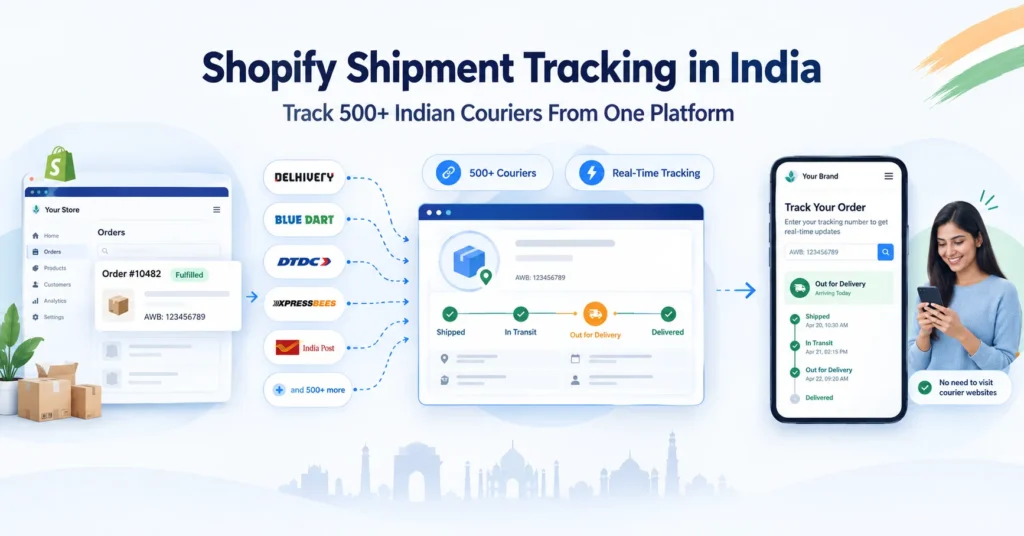
India is one of Shopify’s fastest-growing markets. Thousands of Indian D2C brands, Shopify sellers, and eCommerce entrepreneurs run their stores on Shopify – shipping orders via Delhivery, Blue Dart, DTDC, XpressBees, India Post, and other Indian and international couriers every day. But Shopify’s default shipment tracking has a significant gap for Indian sellers: Shopify’s built-in tracking is designed for global carriers like FedEx, DHL, and UPS – not for the 500+ Indian courier companies that most Indian sellers use. When you ship via Delhivery and add the AWB number to Shopify, your customer’s order status page may say ‘In Transit’ for days with no updates – because Shopify cannot natively pull live tracking from most Indian carriers. The result: WISMO queries flood your support inbox, customers are anxious, and the post-purchase experience that determines whether buyers return is broken. According to a 2025 Security.org survey, 62% of online shoppers feel anxious while waiting for packages to arrive. For Indian Shopify sellers shipping via multiple couriers, this anxiety is amplified by the tracking gap. This guide covers everything Indian Shopify sellers need to know: how Shopify’s default tracking works and where it falls short, how to add tracking for Indian couriers, how to set up a tracking page, how to send automated notifications, and how ShipSagar integrates with Shopify to give you live tracking at Rs 2/shipment with no monthly fee.
62% of shoppers feel anxious waiting for packages – tracking reduces this (Security.org, 2025).
80% of consumers expect real-time shipment tracking updates.
WISMO queries account for 30-50% of all Shopify store support tickets.
Brands with proactive tracking notifications see 40-60% fewer support tickets.
Shopify’s default tracking covers limited Indian couriers – most Indian sellers need a third-party solution
- How Shopify’s Default Order Tracking Works (And Its Limitations for India)
- What Indian Shopify Sellers Actually Need for Shipment Tracking
- Step-by-Step: How to Add Tracking Numbers to Shopify Orders
- How to Automate Shipment Tracking for Indian Couriers on Shopify
- Setting Up a Tracking Page for Your Shopify Store
- Delivery Notifications for Shopify Stores in India
- Shopify + ShipSagar: The Complete Integration Guide
- Comparing Shopify Tracking Solutions for Indian Sellers
- Frequently Asked Questions
How Shopify’s Default Order Tracking Works (And Its Limitations for India)
Before solving the problem, it helps to understand exactly what Shopify provides by default – and where the gap is for Indian sellers.
What Shopify Provides Natively
- Order status page: Every Shopify store has a built-in /orders/[order-id] page where customers can see their order status. This is linked from the default ‘Order Confirmed’ email.
- Fulfillment tracking field: When you fulfill an order in Shopify and add a tracking number + carrier, Shopify displays the tracking number on the order status page with a link to the carrier’s website.
- Track with Shop (default): Shopify activates ‘Track with Shop’ by default – adding a ‘Track with Shop’ button on the order status page. This works well for Shopify’s integrated carrier partners.
- Shopify Email notifications: Shopify sends automated emails for Order Confirmed, Fulfilled, and Delivered – with basic tracking information included.
Where Shopify’s Default Tracking Falls Short for Indian Sellers
| Limitation | What Shopify Does | What Indian Sellers Need |
| Indian courier support | Shopify has deep integration with FedEx, UPS, DHL, USPS – global carriers | Delhivery, Blue Dart, DTDC, XpressBees, India Post, 490+ more Indian carriers |
| Live tracking updates | Shows tracking number + link to carrier’s website – no live status pull for most Indian carriers | Real-time status in the Shopify order page without redirect to courier website |
| WhatsApp notifications | Email notifications only (Order Confirmed, Shipped, Delivered) | WhatsApp notifications – India’s primary communication channel for 535M+ users |
| SMS notifications | Not included in default Shopify notifications | SMS is critical for non-metro Indian buyers who miss emails |
| Branded tracking page | Generic Shopify order status page – not customizable to brand identity | Fully branded tracking page on your Shopify domain with your logo |
| NDR / RTO alerts | No NDR management or RTO alerts | Real-time NDR alerts when delivery fails – critical for India’s high COD RTO rates |
| Multi-courier dashboard | No unified view of all shipments across carriers | Single dashboard showing all orders from Delhivery + Blue Dart + DTDC + India Post |
The bottom line: Shopify is excellent for order management, checkout, and storefront – but it is not built for Indian courier tracking. Indian Shopify sellers need a third-party solution layered on top of Shopify for complete post-purchase tracking.
What Indian Shopify Sellers Actually Need for Shipment Tracking
Here is a complete checklist of what a well-configured Shopify shipment tracking setup should include for Indian eCommerce:
- 500+ Indian courier integrations: Delhivery, Blue Dart, DTDC, XpressBees, Ecom Express, Shadowfax, India Post (Speed Post), Trackon, Professional Couriers, FedEx India, DHL India, and more. Most Indian D2C brands use 3-5 couriers simultaneously.
- Auto carrier detection: Enter any AWB number – the system identifies which courier it belongs to automatically, without you manually specifying the carrier. This is critical for bulk operations.
- Real-time live tracking: Status pulled directly from courier APIs – not just a link to the courier portal. Your Shopify order page or branded tracking page shows live status without the customer leaving your site.
- Automated Email + SMS notifications: Triggered at key milestones – Dispatched, In Transit, Out for Delivery, Delivered, Failed Attempt. Sent without any manual effort after initial setup.
- WhatsApp notifications (optional add-on): For Indian customers, WhatsApp reaches buyers that email does not. Available as an optional add-on – additional usage charges apply.
- Branded tracking page on your Shopify domain: yourstore.myshopify.com/tracking or your custom domain – customers track without visiting Delhivery.com or Blue Dart.com.
- NDR alerts: Real-time notification when a delivery attempt fails – so your team can contact the buyer within hours, before RTO is confirmed.
- Carrier analytics: Per-courier Delivered%, RTO%, transit time data – to make data-driven courier allocation decisions.
- Bulk AWB management: CSV/Excel upload for adding multiple AWBs at once, or API sync from your Shopify store for automated shipment creation.
| KEY POINT The Core Problem in One Sentence: Shopify tells customers their order is ‘Fulfilled’ and shows an AWB number – but for most Indian couriers, Shopify cannot tell them whether the parcel is in Delhi, in a Mumbai hub, or out for delivery today. That gap is where WISMO queries come from. |
Step-by-Step: How to Add Tracking Numbers to Shopify Orders
Before setting up automation, here is how the basic Shopify tracking fulfillment flow works – and the two main methods Indian sellers use:
Method 1 – Manual Fulfillment (For Low Volume)
- Go to Shopify Admin -> Orders -> select the order
- Click ‘Fulfill Items’
- In the ‘Tracking Number’ field, enter the AWB number from your courier
-
- In the ‘Shipping carrier’ dropdown: Select the courier if it appears in Shopify’s list. For most Indian couriers (Delhivery, DTDC, XpressBees etc.), select ‘Other’ – Shopify will show the AWB but cannot pull live tracking from non-integrated carriers.
- Check ‘Send shipment details to your customer’ to trigger the default Shopify Fulfilled email
- Click ‘Fulfill Items’
| NOTE The ‘Other’ Carrier Problem: When you select ‘Other’ as the carrier in Shopify, the tracking number is shown on the order page but there is no live tracking integration. The customer sees the AWB but has to manually go to Delhivery.com or XpressBees.com to check status. This is where the WISMO problem begins for most Indian Shopify sellers. |
Method 2 – Bulk CSV Import (For Medium Volume)
For sellers fulfilling 50-500 orders per day, manually entering AWBs one by one is not viable. Shopify allows bulk fulfillment via CSV import:
- Shopify Admin -> Orders -> Export orders as CSV
- Add tracking numbers in the CSV for each order
- Import the updated CSV via the Shopify Fulfillment API or a Shopify app
Limitation: This still only adds the AWB to the Shopify order record – it does not solve the live tracking or notification gap for Indian couriers.
Method 3 – API Integration (For High Volume / Automated)
For sellers shipping 500+ orders per day, API integration is the only scalable approach. The Shopify Fulfillment API allows your OMS, ERP, or courier aggregator to automatically push fulfillment records – including AWB numbers – to Shopify as orders ship, without any manual step. -> For developer API integration with 500+ Indian couriers: Shipment Tracking API
How to Automate Shipment Tracking for Indian Couriers on Shopify
Automation is the key difference between a Shopify store where customers call to ask ‘Where is my order?’ and one where they track themselves and never need to contact support. Here is how to set up automated tracking for Indian couriers:
Option A – Shopify App Store Solutions
The Shopify App Store has several tracking apps. For Indian sellers specifically, look for apps that explicitly support Indian couriers (Delhivery, Blue Dart, DTDC, XpressBees, India Post). Most global Shopify tracking apps (like AfterShip’s free tier) have limited Indian courier coverage and no WhatsApp notification support.
| App | Indian Courier Support | Pricing | |
| AfterShip | Limited – global-first | Add-on / extra cost | $9-11/month + overages |
| Pragma | India-first, WhatsApp-first | Core feature | Paid tiers ~$9-20/month |
| Track123 | 500+ carriers incl. India | Limited | Free tier available |
| ShipSagar (via API/CSV) | 500+ Indian + global couriers | Optional add-on | Starts at Rs 2/shipment. No monthly fee. |
Option B – ShipSagar Integration with Shopify (Recommended for Indian Sellers)
ShipSagar is not a Shopify app in the traditional sense – it is a standalone multi-courier tracking platform that works alongside your Shopify store via three integration methods:
- Manual / CSV method: Export fulfilled orders from Shopify -> Upload AWBs to ShipSagar via CSV/Excel -> ShipSagar tracks all AWBs across all Indian couriers automatically.
- API integration: Use ShipSagar’s PushShipment API to automatically sync fulfilled Shopify orders to ShipSagar. Every time an order is fulfilled in Shopify, the AWB is automatically pushed to ShipSagar and tracking begins. Zero manual work.
- Webhook integration: Set up Shopify webhooks to push fulfillment events to ShipSagar’s API endpoint. Technical setup but fully automated after configuration.
| INTEGRATION Which Integration Method Is Right for You? Under 100 orders/day: Manual CSV upload to ShipSagar. Takes 5-10 minutes daily. No development needed. 100-500 orders/day: Semi-automated – use Shopify Order Export + ShipSagar bulk upload on schedule. 500+ orders/day: API integration (PushShipment endpoint). Development effort: 1-2 days for a developer. Fully automated after setup. All methods: ShipSagar auto-detects the courier from the AWB format – no need to manually tag Delhivery vs Blue Dart vs DTDC. |
Setting Up a Branded Tracking Page for Your Shopify Store
One of the highest-impact post-purchase improvements a Shopify seller can make is replacing the default Shopify order status page with a branded tracking page on their own domain – showing live courier status in human-friendly language.
The Problem with Shopify’s Default Order Status Page
Shopify’s default order status page has several limitations for Indian sellers:
- It shows the AWB number and a link to the courier website – but for most Indian couriers, there is no embedded live tracking
- It carries Shopify’s generic design – not your brand colors, logo, or identity
- When the customer clicks the tracking link, they leave your website and land on Delhivery.com or Blue Dart.com
- Shopify’s status language is generic (‘Fulfilled’) – not courier-specific (‘Out for Delivery in Mumbai’)
Two Types of Tracking Pages on ShipSagar
| Type | Simple Tracking Page | Branded Tracking Page* |
| Domain | ShipSagar domain (shipsagar.com/track) | Your own domain (yourstore.com/track) |
| Branding | ShipSagar’s interface | Your logo, colors, brand identity |
| Setup time | Minutes | Typically 1 business day |
| Cost | Free – included in Growth Plan | Paid add-on – contact ShipSagar |
| Courier portal redirect? | No – tracks on ShipSagar page | No – tracks on YOUR website |
| Human-friendly status? | Yes – normalized language | Yes – normalized language |
*Branded Tracking Page (custom domain + logo) is available as a paid add-on. Contact ShipSagar for setup and pricing.
How to Set Up Simple Tracking Page (Free – 5 Minutes)
- Create free ShipSagar account at shipsagar.com – 50 shipments free, no credit card
- Add shipments (manual, CSV, or API)
- ShipSagar automatically generates a tracking page on ShipSagar domain for all shipments
- Update Shopify notification emails: Replace default tracking URL with ShipSagar tracking page URL
- Test with a live order – verify tracking page shows correct live status
How to Set Up Branded Tracking Page (Paid Add-On)
- Create ShipSagar account and set up on Growth Plan
- Contact ShipSagar (shipsagar.com/contact-us) to activate Branded Tracking Page add-on
- ShipSagar team sets up your custom domain + logo + brand colors – typically within 1 business day
- Update Shopify notification emails with your new branded tracking URL
-> Branded Tracking Page details: shipsagar.com/branded-tracking-page/
WhatsApp + Email + SMS Delivery Notifications for Shopify Stores in India
Shopify’s default notifications are email-only. For Indian buyers – especially in Tier 2 and Tier 3 cities – email alone reaches only a fraction of the audience that actually opens and acts on delivery notifications. India has 535.8 million WhatsApp users (DataReportal, Digital 2025), and WhatsApp open rates for delivery notifications are 5x higher than email. Shopify’s Default Notification Gaps for India
- Order Confirmed email – usually works, but many buyers in Tier 2/3 don’t check email
- Fulfilled email – sent when you add tracking, but shows limited live tracking for Indian couriers
- No SMS by default – buyers miss email and have no backup
- No WhatsApp at all in Shopify’s native notifications
- No OFD (Out for Delivery) notification – the most important notification for preventing ‘buyer unavailable’ NDRs
- No Failed Delivery notification – NDR goes unnoticed until parcel returns
Adding Automated Notifications via ShipSagar
ShipSagar automatically sends Email notifications at every key delivery milestone – Dispatched, In Transit, Out for Delivery, Delivered, Failed Attempt – across all your courier partners. SMS + WhatsApp notifications are available as an optional add-on with additional usage charges.
| Milestone | Shopify Default | ShipSagar | Impact |
| Order Confirmed | Email only | Immediate reassurance | |
| Dispatched | Generic ‘Fulfilled’ email | Email with AWB + tracking link | Reduces Day 1-2 WISMO |
| In Transit | Nothing | Proactive Email update | Reduces Day 2-4 anxiety |
| Out for Delivery | Nothing | Email OFD alert | Reduces ‘unavailable’ NDRs |
| Delivered | Email only | Email confirmation | Closes purchase loop |
| Failed Delivery (NDR) | Nothing | Real-time alert to seller + buyer | Critical – enables RTO prevention |
| NOTIFICATIONS ShipSagar Notification Structure: Email notifications – INCLUDED in Growth Plan at no extra charge SMS* notifications – paid add-on (additional usage charges, recharge required) WhatsApp* notifications – paid add-on (additional usage charges, Meta API rates apply) *SMS and WhatsApp are paid add-ons. Contact ShipSagar for pricing. |
-> Complete WISMO reduction guide: What Is WISMO?
Shopify + ShipSagar: The Complete Integration Guide
Phase 1 – Initial Setup (Day 1, 30 Minutes)
- Create ShipSagar account: Go to shipsagar.com -> Sign Up -> 50 shipments free, no credit card.
- Configure Email notifications: Dashboard -> Notifications -> Enable Dispatched, OFD, Delivered, Failed Attempt -> Save. 5 minutes.
- Update Shopify notification emails: Shopify Admin -> Settings -> Notifications -> Shipping Confirmation -> Replace tracking URL with ShipSagar tracking page URL.
Phase 2 – Add Your First Shipments
- Manual entry: ShipSagar Dashboard -> Add Shipment -> Enter AWB number -> ShipSagar auto-detects the courier.
- Bulk CSV upload: ShipSagar Dashboard -> Upload -> Download CSV template -> Fill in AWBs from fulfilled Shopify orders -> Upload. Suitable for up to 500 orders/day.
Phase 3 – API Automation (Optional, For 500+ Orders/Day)
- Get API token: ShipSagar Dashboard -> Profile -> API Token -> Copy.
- Use PushShipment API: Build a webhook or scheduled job that pushes fulfilled Shopify order AWBs to ShipSagar’s PushShipment endpoint.
- Test integration: Fulfill a test Shopify order -> Verify AWB appears in ShipSagar -> Verify Email notifications fire -> Verify tracking page shows correct status.
Phase 4 – Optional Add-Ons
- SMS* notifications: Contact ShipSagar to activate SMS add-on. Additional usage charges apply.
- WhatsApp* notifications: Contact ShipSagar to activate WhatsApp add-on. Additional usage charges apply (Meta API rates).
- Branded Tracking Page*: Contact ShipSagar to activate custom domain tracking page. Paid add-on, typically 1 business day setup.
*All add-ons require separate activation and have additional usage charges.
Phase 5 – Monitor and Optimise (Ongoing)
- Daily NDR management: Check ShipSagar for new NDR alerts -> Contact buyers with failed deliveries within 2-4 hours.
- Weekly carrier analytics: Review per-courier Delivered%, RTO%, transit time -> Adjust courier allocation.
Comparing Shopify Tracking Solutions for Indian Sellers
Here is how the main options compare for Indian Shopify sellers:
| Factor | Shopify Default | AfterShip App | Pragma App | ShipSagar |
| Indian Couriers | Limited (FedEx, DHL only) | Partial India support | India-first | 500+ Indian + global |
| Live Indian Tracking | Not available | Limited | Yes | Yes – all 500+ couriers |
| Email Notifications | Yes (basic) | Yes (paid plan) | Yes | Yes – INCLUDED |
| No | Paid add-on | Yes – core feature | Paid add-on* | |
| SMS Notifications | No | Paid add-on | Yes | Paid add-on* |
| Tracking Page | Generic Shopify | Yes (paid) | Yes | Simple (free) + Branded* (add-on) |
| NDR / RTO Alerts | No | No | Yes – RTO focus | Yes – real-time alerts |
| Carrier Analytics | No | Basic | Yes | Per-courier RTO%, transit time |
| Pricing | Free (included) | $9-11/month+ | ~$9-20/month | Starts at Rs 2/shipment. No monthly fee. |
| Free Plan | Yes (limited) | Limited trial | Limited | 50 shipments lifetime free |
*SMS and WhatsApp are paid add-ons. Branded Tracking Page (custom domain) is a paid add-on.
| VERDICT Which Solution Is Right for Your Shopify Store? Small Shopify store (under 50 orders/month): ShipSagar free plan. 50 lifetime tracking credits, Email notifications, simple tracking page. Growing D2C brand (50-500 orders/month): ShipSagar Growth Plan at Rs 2/shipment. Full Email notifications, carrier analytics, NDR alerts, CSV upload. High-volume Shopify store (500+ orders/day): ShipSagar API integration (PushShipment) for fully automated tracking. Need SMS/WhatsApp: Add as paid add-ons on ShipSagar. Contact shipsagar.com for pricing. Need branded tracking page (your domain + logo): Paid add-on on ShipSagar. Contact for pricing and setup. |
Related Guides on ShipSagar
Post-Purchase Tracking Guides:
- What Is WISMO? How to Reduce ‘Where Is My Order’ Queries
- What Is NDR in Courier? Meaning, Causes & How to Manage
- How to Reduce RTO Rate in eCommerce India: 10 Proven Strategies
- Courier Tracking India: Complete Guide